Sign up to the BBC Bitesize newsletter! External Link
For home education news and stories plus updates on the latest Bitesize content, register for our newsletter today.

How to use AI for home education
According to Ofcom’s Children’s Media Literacy Report 2025, half of children say they use artificial intelligence (AI) tools, and an increasing number of those children are using these tools for learning and schoolwork.
Knowing where to begin with AI and home education can feel a little overwhelming, but equipping yourself with some basic knowledge of how it works and how it can help means you and your child can use it to your advantage – and try to avoid some of the pitfalls.
How is AI already being used in education?
According to research by Oxford University Press in 2025, some students aged 13 to 18 use AI to support their education in a range of ways, including:
- Understanding and solving problems
- Presenting their thoughts more clearly
- Coming up with new or better ideas
- Exam preparation and revision
- Speed of processing information
- Improving their work and gaining better grades
Research by the National Literacy Trust suggests almost two thirds (60.9%) of young people who use AI at least once a month use it “for help with homework”.
Teachers are also using AI for things like creating lesson plans, ideas on how to explain complicated concepts, and for creating tools and handouts tailored to students’ specific needs.
Visit the BBC Bitesize Guide to AI to learn more about how AI is being used in education and work.
What are LLMs?
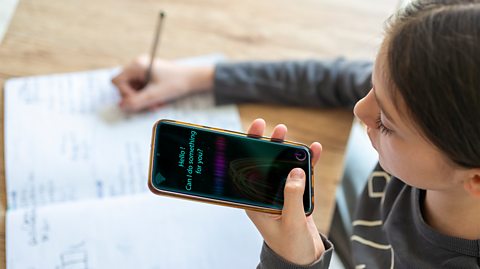
LLM is short for ‘large language model’. It’s one of four types of generative artificial intelligence (AI). LLMs are programmed to recognise and generate text by analysing huge amounts of written data.
It can use this information to generate human-like language, whether for chatbots such as ChatGPT, Google Gemini, Microsoft Copilot, Claude and others, translation, summarising text or other content creation.
How can I use LLMs and AI in home education?
“Generate quizzes, discussion prompts, creative project ideas, crafts and age-appropriate explanations that match your child’s current interests” – home-educating parent Sasha
There are many ways AI and LLMs can be used in home education, particularly as a supplementary ‘teacher’ alongside you, by:
- Creating a study plan for a day, week, month or by specific subject or topic
- Checking work, highlighting mistakes and offering feedback/ways to improve
- Devising personalised learning, revision schedules, flashcards and other tools
Sasha Jackson home educates her children and is founder of website The Home Ed Daily. She says: “Ask the AI to build a study plan tailored to your own child’s interests, strengths and pace. For example, you could generate a four-week plan for a child who enjoys nature, weaving together literacy, science and art ideas.
"Have AI design lessons that fit real interests. For instance, it can turn baking into a maths lesson, or explain photosynthesis in a playful, storybook way."
Sasha adds: “LLMs can also help you see the learning in ordinary everyday activities. You might describe a cardboard house your child built and ask the AI to point out the learning areas covered and suggest ways to extend them.”
AI can help with other things such as research, learning a language, coding and practising all sorts. If your older child needs to write an essay on Macbeth, they could ask AI to create a sample GCSE question, being specific about the exam board, key stage and section of the text they want it to cover.
How can I use AI to measure outcomes and progress?
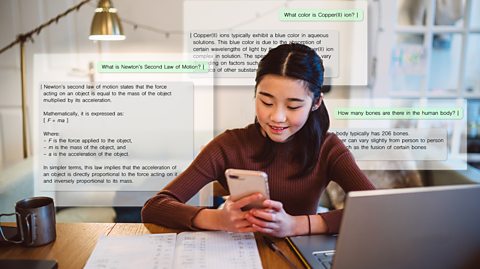
Sasha says you can also use LLMs, “to help you generate questions that prompt your child to reflect on what they’ve learned,” eg ‘What was the most surprising thing you discovered today and why?’
She advises: “Feed the AI bits of work, notes or observations and ask it to summarise patterns or themes. This can help you see where progress has been made. If you describe an activity and the knowledge or skills it involves, however mundane, the AI can link them to learning outcomes and suggest next steps or extension activities if asked.”
She adds: “Just be mindful that AI-generated assessments are not an educational report. They should support your own view of progress, not replace it.”
How can I use AI to support literacy?
According to research by the National Literacy Trust, many young people use AI to improve vocabulary (39.5%), for feedback on writing (20.7%) or to turn ideas into a story (19.3%), including for help with elements such as characters, plot and dialogue.
Some children also use AI to summarise a document or passage, or for help in the interpretation of a text. The key is using AI to supplement active learning, not to do it for them.
AI can help children with dyslexia and other Special Educational Needs and Disabilities (SEND) by summarising texts, checking spelling, converting written word to speech and offering visual representations of information, with personalised learning tools and games for improving reading or writing.
What are the potential pitfalls of using AI in home education?
As with any form of home education, AI will need some form of supervision. A quarter (26%) of young people aged 13 to 18 surveyed for Oxford University Press said AI makes it, “too easy for me to find the answers without doing the work myself” and one in ten believed it limits their creative thinking and impacts their creative writing.
So, it’s worth thinking about how you can use AI while still encouraging your child’s creativity, analytical and critical thinking. If your child is old enough, talk to them about how they use AI and how they maybe shouldn’t outsource their learning to it.
It’s also important to consider where the AI is getting its information from (ie the wider internet) so you can discuss its accuracy with your child, and any data bias - more on that below.
AI also has an environmental impact. Data centres, including those with cloud storage, use significant amounts of energy, so it’s worth checking the sustainability commitments of the AI company, and considering only using it when you really need to, for short amounts of time.
How reliable are ChatGPT and LLMs for home education?
“Treat the AI’s answers as draft ideas rather than [the] final authority.” – home-educating parent Sasha
Reliability is a key concern for parents and teachers, and one that can sometimes be difficult to figure out. Use reliable sources, such as BBC Bitesize, to check facts and cross reference any responses you get. The more you do this the more it will become second nature. You could create a checklist for your child for them to use each time they ask AI a research-related question.
Sasha adds: “If the AI gives references or dates, look them up separately. AI can make up citations or get details wrong. You can prompt the AI to list where information came from or suggest where you might verify it. Treat the AI’s answers as drafts… Your own judgement and a quick check with a reliable resource are what makes the result strong.”
Where do I start with AI for home education?
Sasha’s advice when starting with AI is to “be specific” and “tell the AI exactly what you want”. Explain the background context: “If you want a lesson to be hands-on or linked to a real life event, say so.”
Here's an example prompt to get you thinking:
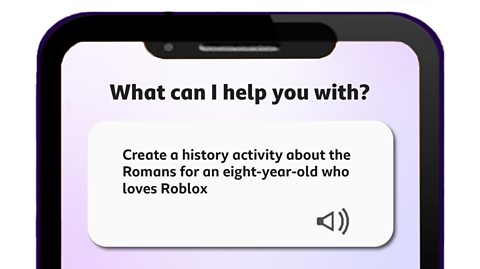
“Include the child’s age, interests and any particular learning goals or special educational needs [SEN]…" Sarah recommends.
"Context really helps the AI tailor the response. Showing the AI a short example of what you like helps shape the results. If you want a quiz, include a sample question so it knows the format to use. If the first reply isn’t quite right, ask follow-up questions: ‘make it simpler’, ‘add more activities’, ‘fit it into 30 minutes’, ‘make it screen free’.”
As with any technology, play around with it first so you get to understand it before you introduce it to your child.
Where can I learn more about AI?
Looking for more tips and advice to support your child in an increasingly online world? Fear not, BBC Bitesize is here to help.
The BBC Bitesize Guide to AI will give you the skills and knowledge you need to get more confident and comfortable using Artificial Intelligence tools, helping you thrive in an AI world.
Check out Other Side of The Story which helps young people navigate fake news and misinformation online. They've got guides on spotting AI images on social media, the ethics of using AI for homework, and you can check out their monthly AI or Real quiz to put your AI spotting skills to the test!
And if it's media literacy resources you're after, look no further than the BBC Bitesize Media Literacy suite, packed with resources for parents, young people and educators.
Where can I find more support for home education and parenting?

The BBC Bitesize home education collection is designed to support you and your child’s learning at home with free downloadable resources, advice articles and videos for children aged two-to-five years old, five-to-11 years old and 11-to-16+ years old.
Bitesize Parenting is the go-to place for the whole parenting community to find stories, expert advice and fun activities.
If your child has special educational needs or disabilities, be sure to check out the Parenting SEND collection. Bitesize has a collection of Sensory Stories, an immersive video series of unique sensory adventures for children with additional needs.
For more information about home education, this BBC News article covers the rise in families deciding to educate their children at home.
