
Creating art on paper
We can create art on paper using different materials.
Pens, pencils and paints can be used to create pictures with lots of colour.
We can even cut out and stick bits of magazines, newspapers or fabric on.
Did you know we can also use computers to create art?
Let's take a look!

Creating art on a computer
You can create art using a digital art program on a computer, tablet or smartphone.
You can use your finger like a pen or paint brush on the screen of a tablet or smartphone.
You can also make art using:
- a mouse on a desktop computer
- a trackpad on a laptop
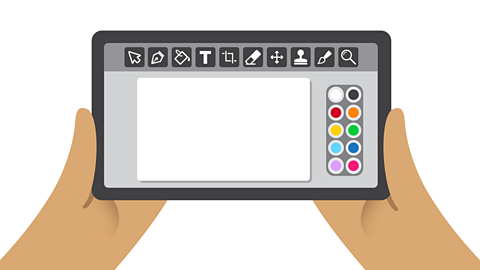
Digital art programs
Digital art programs have a drawing area. They also have tools to paint and draw with.
You can use different tools to help you create digital art such as:
- Pencils, which make a thin line
- Paint brushes, which make a thick line
- Flood/bucket fill, which fills an area with colour
- Airbrushes, which spray lots of small dots

Correcting mistakes on paper
Correcting mistakes on paper can be difficult.
You might have to change your picture or even start again.
Erasers can be used to rub out pencil on paper, but mistakes made with pen or paint could ruin your painting!
Correcting mistakes in digital art
Let's look at how we can correct mistakes when creating art using a digital art program.

Image caption, The undo tool
The undo tool lets you remove the last item you added to the drawing area.

1 of 2

Creating shapes and lines
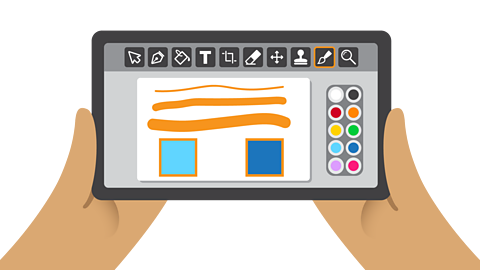
Digital art programs have tools to let you quickly create shapes and straight lines.
The shape tools can be used to create:
- squares and rectangles
- circles and ovals
- triangles
Straight lines can be added using the line tool. You can even use the line tool within different shapes or to make your own shapes.
Changing colours and brushes
We can change how tools work by using different colours or brushes.
You might change the width of the paintbrush tool to make a thicker line.
You might change the fill colour of a square made with the shape tool.
Creating art on paper or a computer?

Image caption, Art on paper
Some people prefer creating art on paper. They like holding a pencil to create a drawing or using a brush to create a painting. However, some people find it can be difficult to fix mistakes they make when using paper.

1 of 2

Over to you
Try creating a picture using different colours and brushes.
Maybe you could draw an animal that has spots or stripes on its body?
Have a go at making a picture containing lots of shapes.
You could use the shapes to draw a picture of a house or boat.
Do you prefer creating art on paper or a computer? Why is this?
Key words
Have a look to learn the meaning of some important words.
Quiz

More on Digital Maker
Find out more by working through a topic
- count1 of 5
- count2 of 5
- count3 of 5
- count4 of 5

